Actions
Feature #8446
closed
BS
RM
Equipment list + search
Feature #8446:
Equipment list + search
Status:
Complete
Priority:
Normal
Assignee:
Target version:
Start date:
09/21/2026
Due date:
% Done:
100%
Estimated time:
Description
Search by name, brand, model, or serial. Shows unit, type, property, brand/model, warranty status, status badge.
Record click → detail
Files
BS Updated by Brian Jay Sio 25 days ago
- Target version set to Version 1.0 — Customers, Properties, Equipment
RM Updated by Richard Madamag 18 days ago
- Status changed from To Do to In Progress
RM Updated by Richard Madamag 16 days ago
- Status changed from In Progress to UAT
- % Done changed from 0 to 100
Equipment list now includes Model Number and Warranty columns, a Clear button to reset filters, and the toolbar matches the customer/property module layout.
RM Updated by Richard Madamag 15 days ago
Testing Steps:
Searching
- Go to Equipments module in the sidebar
- Try to search in the search field by name, brand, model, or serial
- It will filter the list
Pagination
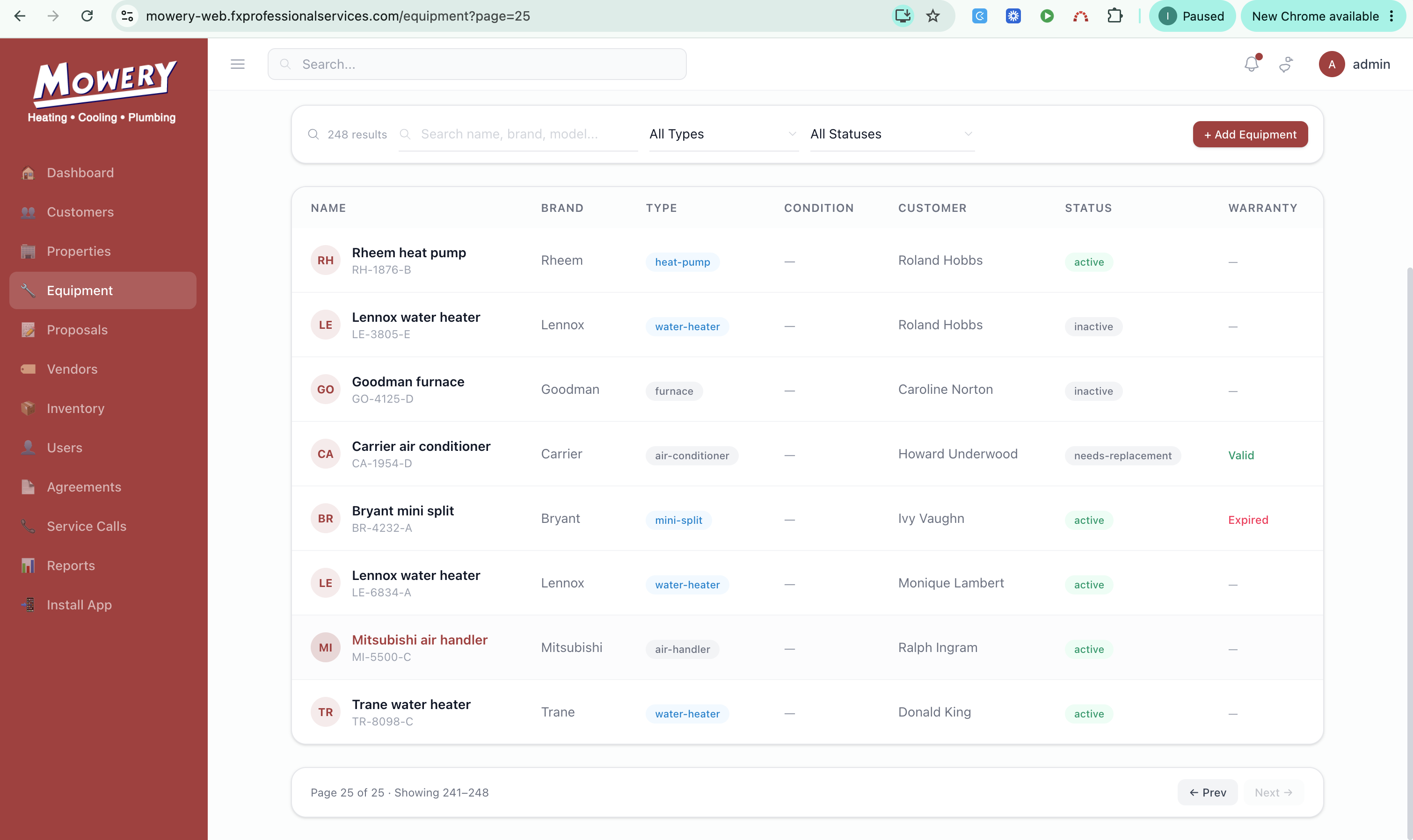
- Observe if it shows "Showing A–B / Page X of Y" with Prev/Next.
Navigation
- Click any records in the list
- It must go Equipments details
JL Updated by Joy Llenos 11 days ago
- File Screen Recording 2026-10-05 at 7.03.15 PM.mov Screen Recording 2026-10-05 at 7.03.15 PM.mov added
Done QA,
The searching of equipment is working well.
But the pagination is not working well. It does not show the Page 2-4 under equipment. It does not "Next" or "Previous".
Navigation does work so well.
Please see attached video
IQ Updated by Irish Quilla 9 days ago
- File clipboard-202610071913-ohcwv.png clipboard-202610071913-ohcwv.png added
- Status changed from UAT to Complete
Retested the issue, and it is now resolved. The Equipment pagination is working correctly, and the Next and Previous buttons now function as expected.
Actions